Have you ever watched Claude stop halfway through your question to go read a docs page? Now look at it from the docs side. On docs hosted by Mintlify, Claude Code alone made about 200 million requests in a month this spring, which is 80 million more than Chrome on Windows! (Mintlify sells docs for agents, so take that with a grain of salt.)
Agents read your docs to work out how to use your product. Context is king for LLMs. But it has to be the right context, and an agent only reads what it's pointed at. Meanwhile most companies still split their docs by who used to read them:
- API docs for developers
- A help center for customers
- MCP docs for agents (usually one page inside the API docs)
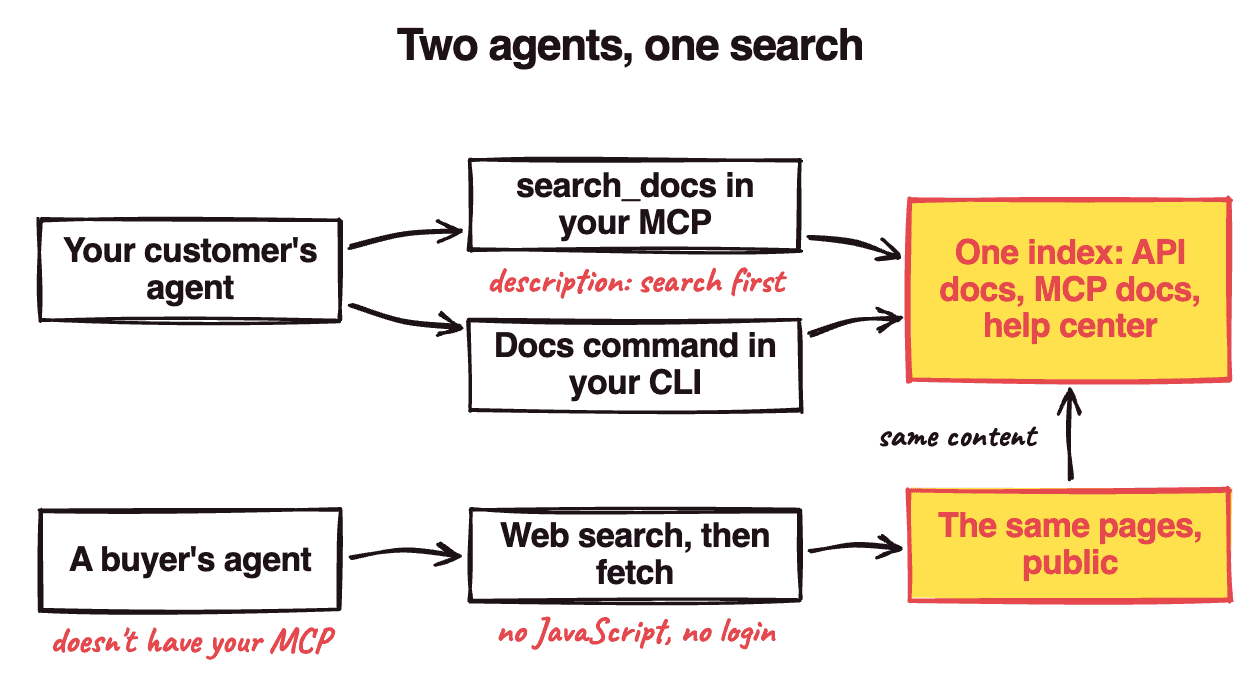
I think that split is wrong now. Put all three behind one search the agent is told to use, and make it reachable from:
- a tool in your MCP
- a command in your CLI
- public pages for everyone else
Otherwise, when your customer asks their agent how to do something in your product, it answers from whatever it remembers. My guess is that's how an agent ends up calling your API the way it worked a year ago. Then your customer has a wrong order or invoice sitting in their books.
Why a docs MCP isn't enough
You probably have at least one of these:
- Your docs MCP only searches the developer docs.
- Nothing tells the agent to search before it answers.
- Your pages need JavaScript or a login to read.
Most docs-search tools in MCPs search one site, and that site is the developer docs. Shopify, HubSpot and Notion all keep their help center on a separate site. So an agent going through your MCP never sees the help center, which is where you explain how customers actually use your product.
Then, even with the docs right there, the agent often doesn't look. Vercel tested this in January on Next.js 16 APIs the models hadn't been trained on:
| Docs setup | Pass rate |
|---|---|
| No docs | 53% |
| A docs skill the agent could load | 53% |
| The same skill, plus instructions to use it | 79% |
A docs index in AGENTS.md, read every session |
100% |
The agent never loaded the skill in 56% of cases! Having the docs scored the same as having none (yikes). Vercel thinks the gap may close as models get better at tool use, but as of January it hadn't (and Vercel doesn't say which model it ran).
So why not put your docs in AGENTS.md? You can't write your customer's AGENTS.md, and all your docs in every session would bury the page that matters. So it has to be a search that returns a few pages.
Last, Claude's web fetch tool can't read pages rendered with JavaScript (unless the agent drives a real browser, which most don't), and it can't get past your login.
Setting up one search
Here's the setup:
- Index your API docs, MCP docs and help center together.
- Return only the few pages that match a query.
- Expose it as a search tool in your MCP.
- Say when to use it, in the tool's description and the server's instructions.
- Point a docs command in your CLI at the same index.
- Keep every page public and readable without JavaScript.
Stripe is the closest I've seen to this. Its MCP can "search the Stripe knowledge base, including documentation and support articles", and its CLI reads the same docs with stripe docs.
Step 4 is Vercel's 79% row. The tool's description is the closest you get to AGENTS.md, and Anthropic calls it the most important factor in whether a tool gets used well. Supabase's search_docs description is a good one to copy:
You should default to calling this even if you think you already know the answer, since the documentation is always being updated.
Claude Code can hold back your tool's definition until it goes looking for tools, so the server's instructions (the text your MCP server sends when it connects) are what tell it to go looking. Here's a sketch of both with the MCP TypeScript SDK (McpServer) and zod; look at the instructions and the description:
// …
const server = new McpServer(
  { name: "acme", version: "1" },
  {
    instructions:
      "Call search_docs before " +
      "answering about Acme.",
  },
);

server.registerTool(
  "search_docs",
  {
    description:
      "Search Acme's API docs, " +
      "MCP docs and help " +
      "center. Call this even " +
      "if you think you know " +
      "the answer; the docs " +
      "are always changing.",
    inputSchema: {
      query: z.string(),
    },
  },
  async ({ query }) => ({
    // same index as the CLI
    content: [{
      type: "text",
      text: await search(query),
    }],
  }),
);
Step 5 is for agents hooked up to your CLI instead of your MCP, since people wire up one or the other. Step 6 is for buyers' agents, which have neither:
Keeping it searched
Once it's set up:
- Re-index whenever a help article or API page changes.
- Check your MCP logs for calls to the search tool.
- If agents aren't calling it, make the description pushier.
Do that, and the next time your customer's agent hits a question your support team already answered, it'll find the article instead of guessing.
Buyers' agents read it too
Now here's the real powerful bonus kicker: marketing. A buyer's agent finds you through web search, so your public docs are what it reads about how your product works.
However, I don't think docs get you onto the shortlist. When one agency checked 100 "best [category] software" searches in June, Google's AI Overviews cited best-of lists about six times in ten, and the recommended vendor's own site about once in eight.
I think docs win the question after that, when a buyer asks how your product would actually do the job. Your landing page says "production planning", and your docs show the steps to plan a production run. If a buyer's agent can lay those steps out for them, I think that's the sale. If it were me, I would buy that software.